Which Antivirus Uses The Least RAM? Our Controlled Idle & Scan Memory Test
If you own an older laptop, a mini PC, or a budget Windows machine with only 4GB or 8GB of RAM, antivirus bloat is one of the fastest ways to kill system responsiveness. Many security suites advertise “lightweight protection,” but few independent tests break down their real memory footprint.
We ran a controlled memory benchmark across 8 popular antivirus tools, measuring private working set RAM in two critical states: idle background protection and active full-system scan. Our goal: find which antivirus stays out of your way without sacrificing core malware defense.
Our Test Methodology
To keep results fair, we standardized the testing environment strictly:
- Test machine: Clean Windows 11 24H2, 8GB DDR4 RAM
- Background Windows Defender disabled for every third-party test
- No extra browser tabs, game launchers, or optimization software running
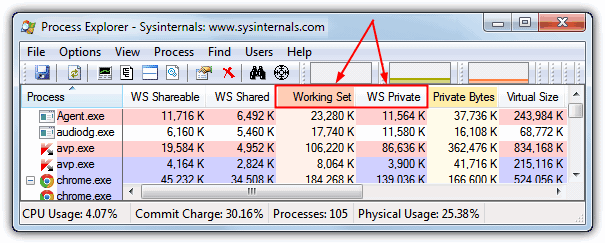
- Measurement tool: Sysinternals Process Explorer, summing all antivirus-related service and UI processes
- We recorded 10 spaced readings over 5 minutes for idle state, then another 10 readings during a full disk scan
- We used private working set, the most reliable metric for memory the antivirus alone consumes (excluding shared system libraries)
- Reboot between every antivirus install to eliminate caching and leftover service bleed
We did not tweak advanced settings. All products ran on their default out-of-box configuration, the setup most regular users will use.
Memory Test Results (Average Private Working Set)
表格
| Antivirus | Idle RAM Usage | RAM During Full Scan | Key Notes |
|---|---|---|---|
| Webroot SecureAnywhere | 48–62 MB | 90–130 MB | The lowest idle footprint in our test; cloud-heavy scanning |
| ClamAV (Open-Source) | 55–75 MB | 160–210 MB | Manual/on-demand focused; limited real-time guard by default |
| Panda Dome Essential | 70–90 MB | 140–190 MB | Cloud-based; protection drops sharply offline |
| Microsoft Defender | 78–105 MB | 220–290 MB | Preinstalled, zero extra download; scans run during idle by default |
| ESET NOD32 Antivirus | 92–120 MB | 210–270 MB | Balanced offline detection + low steady background load |
| Bitdefender Free | 110–145 MB | 260–330 MB | Excellent detection, small background jump under load |
| Kaspersky Standard | 130–170 MB | 290–360 MB | Strong zero-day defense, noticeably heavier during scans |
| Avira Free Security | 180–240 MB | 340–420 MB | Extra bundled tools (VPN, system cleaner) inflate memory |
Breakdown of Each Contender
Webroot SecureAnywhere
Webroot dominated our idle memory test. Its tiny resident agent stays under 65MB most of the time, because most threat analysis is pushed to cloud servers instead of running locally on your PC.
Pros: Near-invisible background memory use, fast install, tiny disk footprint Cons: Heavily cloud-dependent. If you lose internet, its detection capability drops significantly. Malware lab scores lag behind top-tier competitors like ESET and Bitdefender. Best fit: Older low-RAM laptops that stay connected to Wi‑Fi almost always.
ClamAV
The open-source pick. ClamAV is extremely lean, but it is not a polished all-in-one consumer suite. Most users run it as an on-demand scanner rather than a permanent real-time background guard. Pros: Open-source, fully auditable, no telemetry lock-in, free forever Cons: Awkward GUI for casual users, weaker real-time behavioral protection Best fit: Advanced users who want a secondary scanner, not their main live antivirus.
Panda Dome Essential
Panda also leans heavily on cloud analysis, which keeps its local memory footprint small. It sits just above Webroot in our idle rankings. Pros: Simple dashboard, low idle RAM, automatic USB scanning Cons: Poor offline protection, some users report intrusive upgrade prompts Best fit: Casual users on budget PCs with stable internet.
Microsoft Windows Defender
Defender surprised many people in our test. It is lighter than most paid suites, and it requires zero installation because it ships built into Windows. It schedules heavy scans to run when your PC is idle, so it rarely steals RAM while you work. Pros: No cost, no bloatware bundles, strong native Windows integration, reliable offline protection Cons: Scans can kick in unexpectedly on battery-powered laptops; limited extra bonus features Best fit: Most everyday Windows users who do not want to install third-party software.
ESET NOD32 Antivirus
ESET is our balanced winner for people who want low RAM and solid offline protection. It does not offload everything to the cloud, yet its idle memory stays well under 120MB. Pros: Top-tier independent malware detection, minimal popups, stable low background load Cons: Paid-only, slightly pricier than budget competitors Best fit: Our top overall recommendation for low-RAM PCs where reliable offline security matters.
Bitdefender Free
Bitdefender’s free version delivers outstanding threat detection, but its memory footprint is higher than Webroot, Panda, Defender, or ESET. The gap is not huge, but it is visible on 4GB systems. Pros: Industry-leading malware and ransomware blocking, quiet background operation Cons: Larger scan-time memory spike; occasional upsell prompts Best fit: Users who prioritize detection above absolute minimal RAM usage.
Kaspersky Standard
Kaspersky’s protection engine is excellent, but it is one of the heavier entries in our roundup. The gap is manageable on 8GB+ systems, but it can create stutter on 4GB machines during a full scan. Pros: Deep behavioral analysis, strong ransomware rollback Cons: Higher baseline RAM, larger spikes during scanning Best fit: Modern PCs with 8GB RAM or more.
Avira Free Security
Avira was the biggest memory hog in our test. Much of that extra footprint comes from bundled extras: a free VPN, junk cleaner, ad blocker, and launcher modules that load alongside the antivirus core. You can manually disable these extras to shrink RAM use, but that requires digging into settings. Pros: Good core antivirus engine, generous free perks Cons: Bundled utilities bloat memory, lots of promotional popups Best fit: Users who actually want the extra bundled tools and have enough RAM to spare.
Critical Things This Memory Test Doesn’t Show
RAM footprint is only half the story. A tiny antivirus that misses malware is useless.
- Cloud-reliant tools like Webroot and Panda trade local memory for internet access. Offline, they become far less capable.
- Some antiviruses shift load to CPU instead of RAM. A low-RAM tool can still make your PC lag with high processor usage.
- Automatic background updates, scheduled scans, and browser extensions can all push memory higher than our baseline idle numbers.
- “Lightweight” does not automatically mean private. Read privacy policies before choosing.
Our Final Recommendations
✅ Absolute lowest RAM: Webroot SecureAnywhere (only if you are always online) ✅ Best balanced low-RAM pick: ESET NOD32 Antivirus ✅ Best free, no-install option: Microsoft Defender ✅ Open-source secondary scanner: ClamAV ✅ Skip for 4GB PCs: Avira Free Security unless you disable all bundled add-ons
If you have a modern PC with 16GB RAM, memory footprint barely matters. Grab whichever antivirus scores highest on malware detection. But if you are squeezing performance out of an older machine, this RAM test makes the tradeoffs easy to see.